
Boost your product management process by integrating ProductMix with Asana. Follow this step-by-step guide to get started.
Connecting ProductMix to Asana: #
Navigate to ProductMix Dashboard:
– Open the ProductMix Dashboard.
– Go to the Settings tab.
– Choose Integrations.
Link to Asana:
– Find Asana from the list.
– Hit the Connect button next to Asana.

Authorize Access:
– Log in with your Asana credentials when prompted.
– Select Allow to give ProductMix permission.
Importing Backlog Items from Asana to ProductMix: #
Access Asana Settings in ProductMix:
– From your dashboard, locate the Asana integration segment.
– Click on Settings.
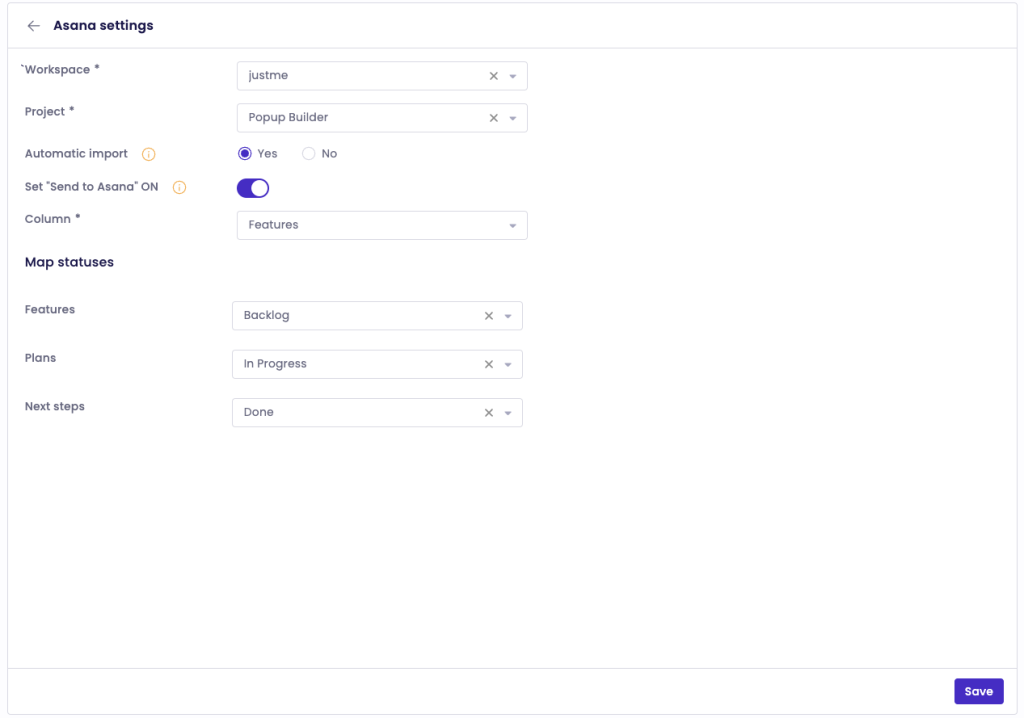
Set Up Backlog Item Import:
– Within Asana Settings, select the particular project you wish to sync.
– Turn on automatic import for new Asana tasks.
– Match Asana task statuses with ProductMix’s backlog statuses.
– Validate your preferences by clicking Save.
Inspect Imported Backlog Items:
– Transition to the Backlog segment within ProductMix.
– Scrutinize the items that have been imported from Asana.
Note: If you want to shift backlog items from ProductMix to Asana, ensure to configure the appropriate settings in the backlog section.