
Congratulations on choosing ProductMix to streamline your customer feedback management process and build products that your users love! This knowledge base article will provide you with an overview of our platform and introduce you to some of the core aspects and features of the app.
Overview #
ProductMix is designed to help you collect, organize, and act on customer feedback, ensuring that your product is aligned with your users’ needs and preferences. By leveraging the power of customer feedback, you can make data-driven decisions, prioritize features, and create a product roadmap that resonates with your audience.
Key Aspects of ProductMix #
What are the key building blocks of ProductMix? They are the following:
Product Portal #
The Product Portal is the central hub where your users can submit their ideas, vote on existing suggestions, and stay informed about your product’s progress. You can access your Product Portal through a unique URL provided by ProductMix, or embed it directly into your website or application for seamless integration. You can even put the portal on your own custom subdomain as well. The Product Portal can be customized to match your brand’s look and feel, creating a cohesive experience for your users.
You can also select what your portal displays to your customers, enabling or disabling one or more of the following features: customer feedback, your product roadmap, or your changelog. More information about the Product Portal can be found here: https://help.productmix.com/docs/how-to-manage-a-portal-on-productmix/

Collecting Ideas & Feedback #
ProductMix makes it easy to gather customer feedback from multiple channels, including your Product Portal, email, social media, and integrated tools like Intercom or Slack. Users can submit their ideas, suggestions, and feature requests, which are then centralized in your ProductMix dashboard for easy analysis and prioritization. You can also use the Chrome extension to capture feedback on the go, ensuring that no valuable insights slip through the cracks. Learn more about how to manage ideas here: https://help.productmix.com/docs/how-to-manage-ideas-on-ProductMix/.

Product Roadmap #
The Product Roadmap feature allows you to showcase your product’s development plans and keep your users informed about upcoming releases and improvements. The Product Roadmap contains customer feedback items, which can be ordered and prioritized according to a customizable scoring system.
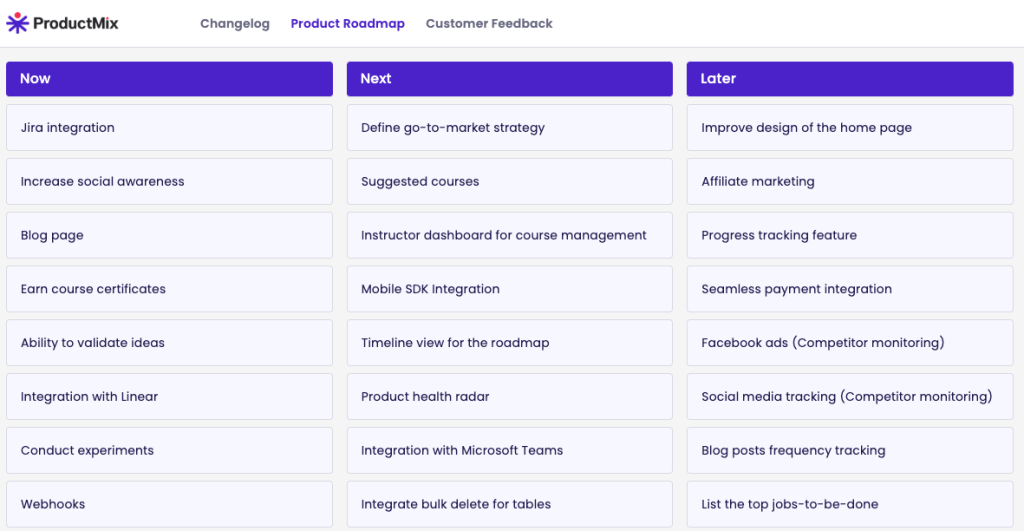
By prioritizing features based on customer feedback and strategic goals, you can create a clear, customer-centric roadmap that demonstrates your commitment to user satisfaction. The roadmap can be made public or kept private, depending on your preferences, and can be easily updated as your plans evolve. Learn more about how to manage your product roadmap here: https://help.productmix.com/docs/how-to-manage-the-roadmap-on-ProductMix/
Change Log / Announcements #
Keep your users engaged and informed with ProductMix’s Changelog. Share product updates, new feature releases, and other important information with your users through visually appealing, rich media announcements. You can schedule announcements in advance, pin critical updates, and categorize them for easy navigation. Additionally, users can provide feedback on your announcements, fostering a two-way conversation and helping you gauge the impact of your product changes. Learn more about how to manage your changelog here: https://help.productmix.com/docs/how-to-manage-announcements-on-ProductMix/

Connecting your SaaS Application or Website #
ProductMix seamlessly integrates with your existing SaaS application or website, allowing you to embed the Product Portal, feedback forms, and other widgets directly into your platform. This creates a unified experience for your users and makes it easy for them to provide feedback without navigating away from your application. Additionally, ProductMix can be connected with your SaaS application or system to send customer data to ProductMix to help you make more informed decisions. Some of the information you can send includes:
- Profile information & occupation
- Location
- Current Plan
- Feature usage
- and other actions
Learn more information about where to find your embed code as well as how to connect your SaaS and send data to ProductMix.
3rd-Party Integrations #
ProductMix also offers a range of integrations with popular tools like Jira, Trello, Slack, and Intercom where you can accept new ideas & feedback, or integrate with downstream processes to manage the implementation of each feedback item. These integrations can help ensure your feedback management process fits seamlessly into your existing workflow.
Getting Started #
To get started with ProductMix, simply sign up for an account and follow the step-by-step onboarding process. Our user-friendly interface and comprehensive documentation will guide you through setting up your Product Portal, configuring your feedback channels, and customizing your Product Roadmap. If you have any questions or need assistance, our dedicated support team is always ready to help.
Start harnessing the power of customer feedback today with ProductMix and take your product development to the next level!